
 Â
Â
After all the upgrades of the other email services I still prefer Gmail over the rest. I get too much junk mail with Yahoo, and Hotmail is difficult access because of the heavy load of the interface. The other mail services have increased their amount of space past what Gmail offers, and Yahoo offers unlimited space unlike the 3.1 GB you have with Gmail. In reality its not unlimited space, there will be a limit which can be reached but we don’t know how much it is.
With Gmail you can upgrade your amount of space based on payment, and the amounts are very decent for the amount of space.Â
- 10 GB ($20.00 USD per year)Â
- 40 GB ($75.00 USD per year)Â Â
- 150 GB ($250.00 USD per year)Â Â
- 400 GB ($500.00 USD per year)Â
Right now I’m not in need of extra space, but there is an option to upgrade which is good.
At this point Gmail is upgrading all their space, so with the free account your storage will bump to 6 GB by Jan of 2008. And also the premium accounts will be upgraded so the 10 GB will become 25 GB.
Link: LifeHacker

This is just getting ridiculous, I didn’t even know how many useful sites Qualitynet is blocking. Forget they are blocking really useful and informational content, and the funny part so that people don’t get annoyed directly with Qualitynet they have changed the look of the blocking page they use which is very funny. They even removed the Qnet contact email which used to be there for mistakes, I think too many people emailed them and they don’t want to listen to anyone anymore.
Forget that they are blocking torrent sites for no reason, and they say its the Ministry of Communication requesting it from them but its odd they wouldn’t request it from the other ISPs who aren’t blocking them. They have blocked BoingBoing which wasn’t blocked the week before, and I was surfing it normally reading up on articles from physics to the latest technology, and funny stories. I just find it ridiculous that they have no criteria and that they are even blocking anything what so ever. There are ways to get around it but its still really annoying.

Gridskipper, the decadent urban travel guide. Scouring the globe for chic hotels, hot restaurants, sweet nightlife, and pretty people.
As I was surfing the net I came across Gridskipper which is an online urban travel guide, it gives you information on an area that only a local would know and that no travel guide can help with. When going through the information on cities that I know very well it turned out the information is very up to date and gives you really good details. They give you the ins & outs of cities with details of the hips places and they are constantly updating. I think this is a great website whenever visiting a major city.
Whats great is that whenever there is an entry or information about a new place they visited its always attached to Google maps interactive image, so you can click it as if Google Maps is on your desktop just by clicking the entry, I think thats a great feature. Those Google maps are only there when the city has it covered, they went to Dubai but it doesn’t seem in depth. There are some really good tips though, I found a good comic book store to go to in New York when I pass by there again.
Link: gridskipper

Mail Space! Google started this war a few years back and now the rest have caught up. Hotmail has now reached 5.3 GBs and Yahoo is unlimited, but I don’t think space is the biggest factor at this point. Its the user interface and experience which makes the difference as of right now I still think Google has the better interface after that would be Yahoo, Hotmail still has a lot of kinks to workout. Hotmails’ interface has some similarities to Outlook and I don’t think its a good thing they should have streamlined there interface instead. Yahoo has a very good seamless interface making it really easy to go through a lot of emails without any issues. My only problem is that I get so much spam on yahoo account that I find it unusable or else I would have had it as my secondary email instead of my primary email.
At this point you do have a lot of choices and a lot choices.

My Current Ranking For Free Emails:
- Gmail
- Yahoo
- Hotmail

Link: LifeHacker
Link: News

I have been using WordPress for a little while and I have gotten used to using the shortcuts and this is just a simple list of the shortcuts available. The strange thing is that it doesn’t work in every browser every time, but sometimes just a few of them don’t work. Its really useful when you type a lot and very quickly want to do something.
Just a few shortcuts for those who use WordPress:
- Bold: Alt+SHIFT+b
- Italics: Alt+SHIFT+i
- Link: Alt+SHIFT+a
- Blockquote: Alt+SHIFT+q
- Code: Alt+SHIFT+c
- Read More: Alt+SHIFT+t
- Unordered List (ul): Alt+SHIFT+u
- Ordered List (ol): Alt+SHIFT+o
- List Item (li): Alt+SHIFT+l
Link: TipMonkies

I usually just read other people’s blog and comment, but this has to be one of the funniest blog posts I have seen. K.theKuwaiti breaks down the different category of bloggers and I was laughing while reading through it. If you want a laugh, its worth a laugh.
Link: K.theKuwaiti
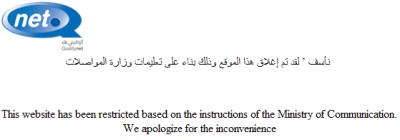
Don’t they ever get tired of this? It is the third or fourth time that they block the website! I really don’t get why they are blocking it, its really a waste of time. There is a lot good stuff that we get from Torrentspy and Torrentz, and its not because of copyright that they are blocking it. Its annoying that they keep doing this, and I wonder how long it will take until they unblock it.
This website has been restricted based on the instructions of the Ministry of Communication.
We apologize for the inconvenience
I ask all to flood Qnet with emails to unblock it: support@qualitynet.net
P.S. They have unblocked ZDistrict.com at NBK, but it is still blocked at CBK (Al Tijari). Can someone check it out for me and let me know, I’m just curious!
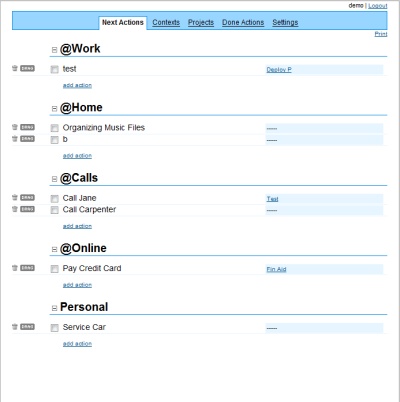
This is an online To Do list organizer, GTD stands for Getting Things Done. The one thing I have always wanted but have never come to it is making a good To Do List, but Simple GTD is the answer to that request. The interface is simple and you create the Categories “Contexts” and the Tasks “Projects” in each one.
It is really simple and dynamic, and all the information is online, you completely customize it to your needs and your lists. It is accessible all online, if a simple dynamic To Do list is what you want then this is the best you can get with a very smooth interface. I have the tendency to want to do a lot of things at once, and writing them down will be the only way to remember, this is just one of those great little tools which can only help you.
Link: Simple GTD
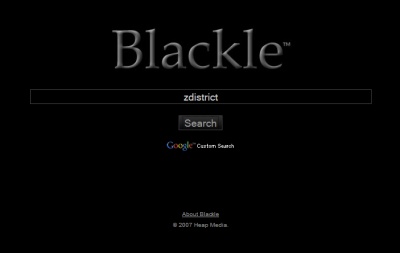
Somebody decided to clone a fully functional Google website but with a dark theme, I think it is clever and interesting that they did this. In this iteration of Blackle you can only use it to search inside of Google, but with the Blackle formating. It seems that having a black background takes less energy to display then a white background from Google. It was a bit strange seeing Google like that but was an alter ego.
Link: Oh Gizmo

Lifehacker.com is a very useful website for the techy geeks, and they have put together some very useful top 10s which work with Windows, OS X, Ubuntu, and Linux.